
Rust-Powered AI Image Editing
What It Speeds Up, and What It Cannot
Developers evaluating fast AI tools keep running into the same claim, and it is almost never explained. Rust-powered AI image editing is a statement about the pipeline around the model — decode, resample, parallelism, encode, delivery — not about the model itself, which runs as GPU kernels and does not care what language launched it. This page sets out where Rust genuinely wins in efficient image processing, where the accelerator still decides everything, and what your latency budget actually looks like. Then it gives you a free 4K editor so you can measure instead of guess.
Try It Now — Free
Six presets covering the edits that actually fill a working queue — exposure, cutout, colour grade, detail, object removal and background replacement. Upload a photo, pick one, and time the round trip yourself.
AI Image Editor
Upload a photo, choose the edit you need, and get a 4K-class result in about fifteen seconds. Hosted and GPU-backed — no install, no account, no card.
Upload the photo you want to edit, pick a preset, and click Generate — most edits come back in roughly fifteen seconds
Six Edits That Fill a Real Queue
Exposure, cutout, grade, detail, object removal and background replacement — every frame below was produced with the editor on this page
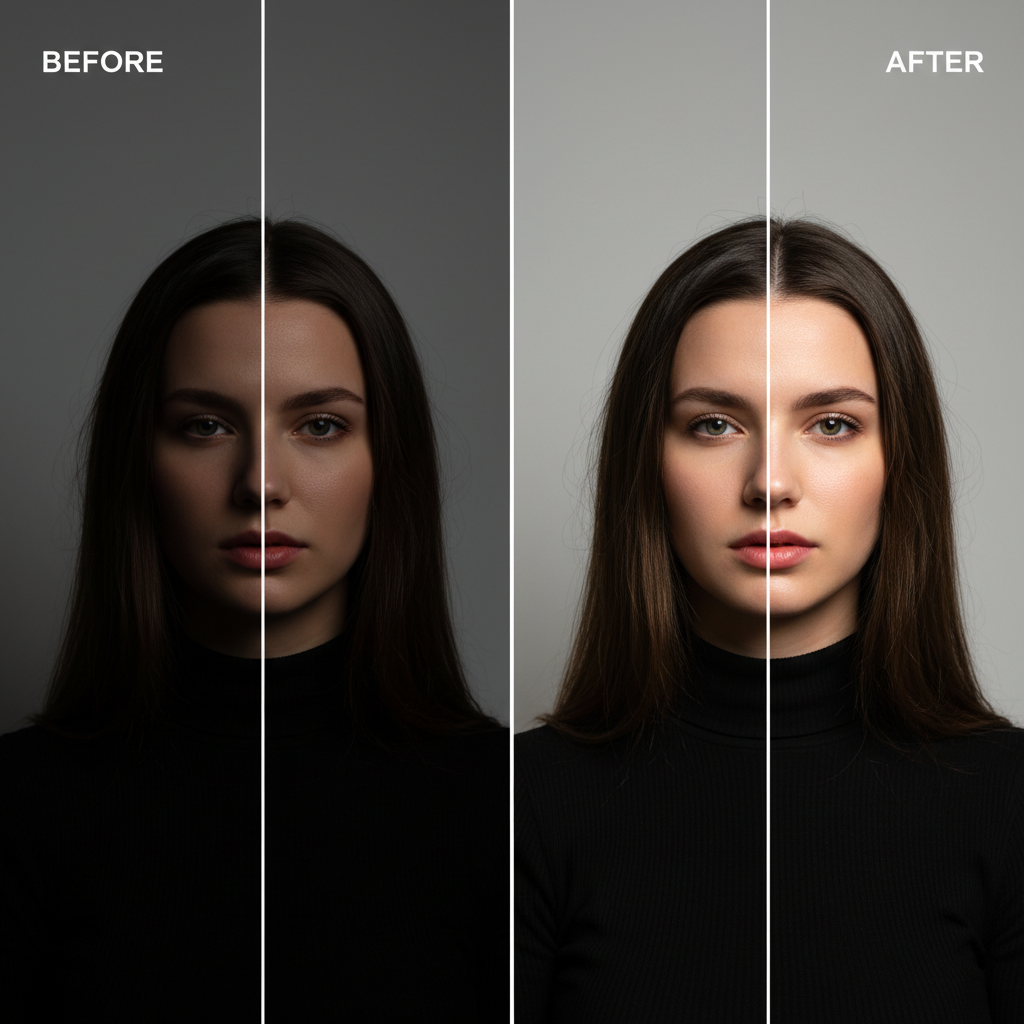
Exposure and Colour Correction
The most common edit of all

Product Cutout on White
Catalogue-ready in one pass

Cinematic Colour Grade
A look, not a slider

Detail Enhancement
Where resolution is the bottleneck
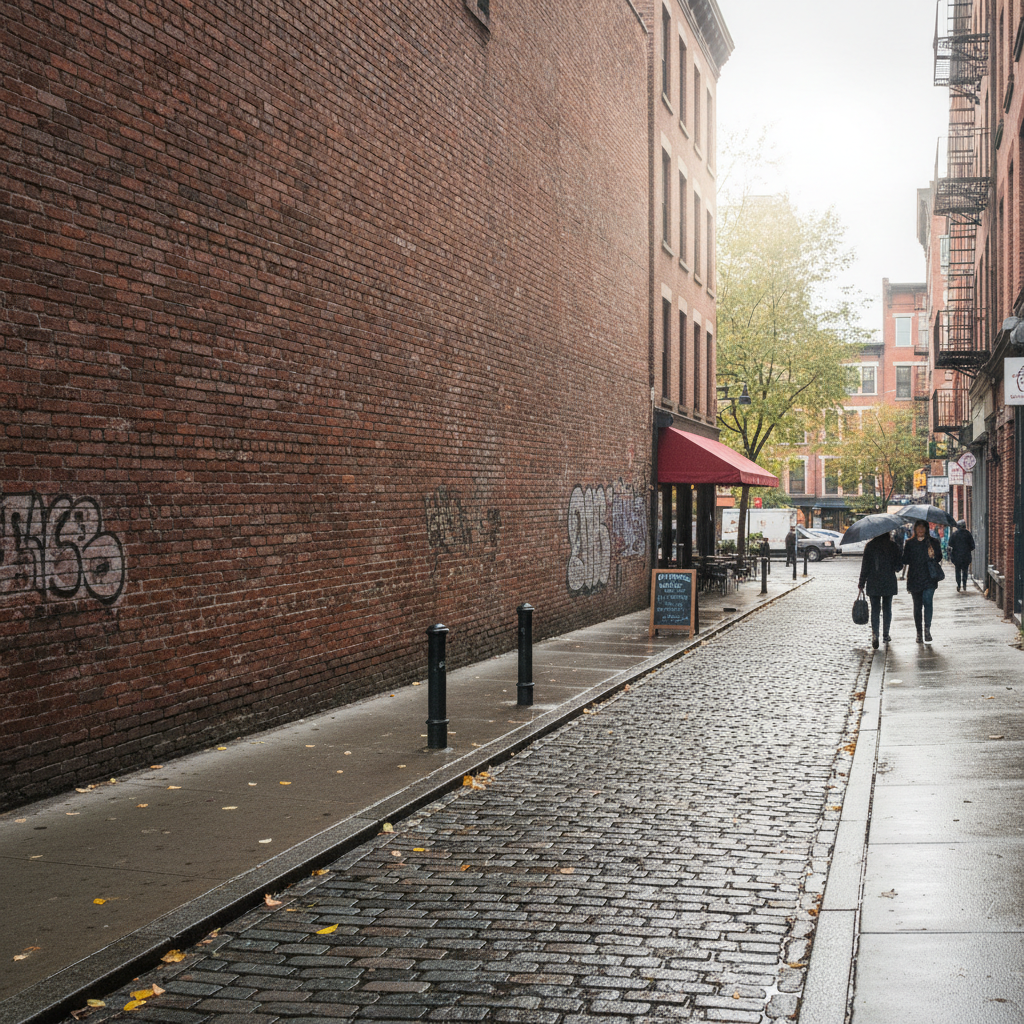
Object Removal
The edit that used to take an hour

Background Replacement
Hair edges are the hard part
How to Use the Editor on This Page
Three steps, about fifteen seconds — nothing to compile, install or configure
Upload Your Photo
Drop in the image you want to change. Give it the largest version you have rather than a resized copy — every downstream stage inherits whatever detail you start with, and no amount of enhancement genuinely recovers information that was thrown away by an earlier compression pass.
Choose the Edit
Each preset carries a full instruction — what to change, what to preserve, and what the finish should be. That second clause is the one people omit when writing their own prompt, and it is why edits come back with the subject subtly redrawn. Constraining what must stay fixed is most of the skill.
Measure the Round Trip
The result arrives at 4K-class resolution in roughly fifteen seconds. If you are benchmarking tools, time this end to end and compare against whatever else you are evaluating — a number you produced beats a vendor chart. Paid plans from $2.99 add watermark-free files and commercial rights.
Where the Time Really Goes in AI Image Editing
Six stages, what bounds each one, and whether a Rust rewrite would move it
| Stage | Typical Cost | Bound By | Does Rust Help? |
|---|---|---|---|
| Upload and network transfer | Highly variable — 0.2s to several seconds | Bandwidth and geography | No — a CDN and edge termination fix this |
| Decode and preprocessing | Tens to a few hundred milliseconds | CPU, single-threaded by default | Yes — the clearest win, especially with rayon and SIMD |
| Queue wait under load | 0s idle, seconds to minutes at peak | GPU capacity and scheduling | No — this is a capacity problem, not a language problem |
| Model inference | Usually the dominant term | GPU kernels and model size | No — the host language barely touches this |
| Postprocessing and encode | Tens to a few hundred milliseconds | CPU and output format | Yes — same reasoning as decode |
| Storage write and delivery | Tens to hundreds of milliseconds | Object storage and CDN | Marginally — I/O bound, not compute bound |
Read the table before optimising anything. Two of the six stages respond well to a native, parallel, non-GC implementation, and those two are where rust-powered AI image editing earns its name. The other four are bound by the accelerator, the queue depth, the network and the object store — and a language rewrite moves none of them. The failure mode this is meant to prevent is a team spending a quarter porting preprocessing to Rust while their users are actually waiting behind a saturated GPU pool. Profile first; the honest answer is often capacity rather than code.
What Rust Brings to Efficient Image Processing
Five genuine engineering arguments, and one plain statement about what this page runs on
Rust Speeds Up the Pipeline, Not the Model
This is the single most important thing to understand about rust-powered AI image editing, and it is the thing marketing pages leave out. Diffusion inference runs as compiled kernels on a GPU through CUDA, Metal or an equivalent backend. Whether the process that launched those kernels was written in Rust, Python or Go changes the denoising loop by approximately nothing. What Rust genuinely accelerates is everything wrapped around it: decoding the upload, resampling, colour conversion, tiling, buffer management, encoding and delivery. On a loaded service that surrounding work is a real fraction of the time a user actually waits, so the gain is worth having. It is simply not the gain the phrase implies.
No Garbage Collector Means Predictable Tail Latency
Rust manages memory through ownership checked at compile time rather than through a runtime collector, which means there is no pause that arrives at an unpredictable moment under load. For a median request this rarely matters. For the slowest one percent it matters a great deal, and p99 latency is what users describe as "sometimes it just hangs". This is exactly the reason engineering teams have historically moved latency-sensitive services off GC-managed runtimes — Discord published a well-known account of doing precisely that. In an image pipeline the same logic applies to any stage handling large buffers, because large short-lived allocations are what stress a collector most.
Memory Safety Is the Underrated Argument
Image decoders parse untrusted binary data submitted by strangers, which has made them one of the most reliably exploited surfaces in software — decades of CVEs across JPEG, PNG, TIFF and WebP libraries written in C. Rust makes an entire category of buffer overruns and use-after-frees impossible at compile time rather than merely unlikely after testing. Mozilla shipped Rust media parsers in Firefox for this reason, and Android has been steadily replacing memory-unsafe components on the same reasoning. For any service accepting arbitrary uploads, this is a stronger case for the language than the performance one, and it is the case that gets made least often.
Fearless Parallelism Across Tiles and Pixels
Image work is close to ideal for data parallelism: most operations on one tile do not depend on any other tile. Rust's type system proves at compile time that parallel code is free of data races, so splitting work across every available core stops being a source of intermittent, unreproducible corruption. In practice this is the rayon crate turning a sequential iterator into a work-stealing parallel one with a one-line change. Combined with SIMD, this is where the multiple-times speedups in efficient image processing genuinely come from — not from the language being fast in the abstract, but from it making the parallel version safe enough that you actually ship it.
The Ecosystem Is Real, Not Aspirational
It is fair to ask whether any of this exists outside conference talks. It does. The image crate handles decode and encode across common formats; imageproc adds filters, edge detection and geometric transforms. Rayon covers parallelism. On the machine learning side, candle from Hugging Face and burn are working Rust inference frameworks, and wgpu offers a portable GPU abstraction over Vulkan, Metal and DirectX. Rust also compiles to WebAssembly with a small runtime, which is why an increasing share of browser-side image tooling is written in it. This is a production ecosystem with rough edges, not a research project.
What This Page Runs On — Stated Plainly
The editor below is a hosted service. Your image and instruction go to our servers, Nano Banana Pro runs on GPU accelerators, and a 4K-class result comes back in roughly fifteen seconds. It is not a Rust binary running in your browser, and we would rather write that sentence than let a page with this title imply otherwise. The number that affects you is the fifteen seconds, and that number is set by the accelerator and the queue depth rather than by any host language. The reason this page exists is that if you are choosing tools on performance, you should be able to measure one rather than read a benchmark table you cannot reproduce.
Who Actually Needs High-Performance Editing
Four groups for whom throughput is a requirement rather than a preference
Engineers Building an Image Pipeline
If you are the person who has to make thumbnail generation, format conversion and preprocessing keep up with traffic, Rust is a defensible choice on both performance and safety grounds — and the ecosystem is far enough along that you are not writing decoders yourself. The advice that saves the most time is to instrument the whole path before you rewrite any of it. Teams routinely discover the bottleneck was a synchronous storage write or a queue with too few workers, neither of which cares what language it was written in.
High-Volume Studios and Marketplaces
Catalogue teams processing thousands of product shots a week feel pipeline efficiency directly, because a hundred milliseconds saved per image compounds across the batch into real hours and real compute cost. This is the clearest commercial case for efficient image processing. It is also the case where the AI step and the mechanical step should be measured separately — batch resizing and cutting out backgrounds have very different cost curves, and conflating them hides which one is actually expensive.
Developers Shipping Editing in the Browser
If your product does crops, resizes, filters or format conversion client-side, compiling Rust to WebAssembly gives you near-native speed on the user’s own machine with no upload and no round trip, which is both faster and cheaper than a server call. What will not fit in that budget is the diffusion model itself. The realistic architecture is hybrid: WebAssembly for the immediate manipulation, a hosted call for the generative step. Designing for that split from the start is much easier than retrofitting it later.
Technical Creators Choosing Fast AI Tools
If you are not building the pipeline and simply want the edit done, the implementation language is not a useful selection criterion — the observable numbers are time to result, output resolution, how well the tool preserves what you did not ask it to change, and price. Test those directly on your own images. A tool that returns in eight seconds but quietly redraws your subject is worse than one that takes fifteen and leaves it alone, and no architecture diagram will tell you which you are looking at.
Rust-Powered AI Image Editing — FAQ
What the language changes, what the GPU decides, and where the latency really goes
Stop Reading Benchmarks. Time One.
The only performance number that settles anything is the one you measured on your own image. This editor is free, needs no account and returns a 4K-class result in about fifteen seconds — so you can have that number in the next minute rather than after an afternoon of vendor comparisons.
Start Editing FreeAn Engineer's Guide to Rust-Powered AI Image Editing
The phrase rust-powered AI image editing has spread faster than any explanation of it, and the gap is worth closing because the underlying engineering is genuinely interesting. Rust earns its reputation in image work for three concrete reasons. It compiles to native code with no interpreter and no garbage collector, so there is no collection pause arriving unpredictably in the middle of a request — which is why tail latency, not median latency, is where the difference shows up. Its ownership model proves at compile time that parallel code is free of data races, which makes splitting work across every core a routine change rather than a source of intermittent corruption; in practice that is the rayon crate and a one-line edit. And it eliminates a whole category of memory-corruption bugs in code that parses untrusted binary uploads, which is exactly what an image decoder is and exactly why JPEG, PNG, TIFF and WebP libraries have produced CVEs for decades.
What Rust does not do is make the model faster. Diffusion inference is compiled GPU kernels executing through CUDA, Metal or an equivalent backend, and the host language that launched them contributes almost nothing to the denoising loop. Any page implying that a language choice cuts your generation time in half is describing something other than how these systems work. The accurate version is narrower and still useful: on a busy service, decode, resampling, colour conversion, tiling, encode and delivery are a real fraction of what a user waits through, and a native parallel implementation of those stages measurably reduces it. That is a legitimate reason to reach for high-performance editing infrastructure. It is not a reason to expect a different model output or a dramatically shorter inference step, and the difference between those two claims is the whole point of this page.
The ecosystem behind these claims is real rather than aspirational. The image crate handles decoding and encoding across common formats and imageproc layers filtering, edge detection and geometric transforms on top; rayon covers data parallelism; candle from Hugging Face and burn are working Rust inference frameworks; wgpu abstracts the GPU across Vulkan, Metal and DirectX. Rust also compiles to WebAssembly with a small runtime, which is why a growing share of browser-side image tooling is written in it — client-side crops, resizes and filters run at near-native speed on the user's own machine with no upload at all. What still does not fit in a browser tab is a multi-billion-parameter image model, so the realistic shape of a modern product is hybrid: WebAssembly for immediate local manipulation, a hosted call for the generative step. Designing for that split early is far cheaper than retrofitting it.
The editor on this page is that hosted step, and it is not a Rust binary running in your browser — we would rather write the sentence than let the title imply otherwise. Your image goes to our servers, Nano Banana Pro runs on GPU accelerators, and a 4K-class result comes back in roughly fifteen seconds, with nothing to install and no account required. Whether you arrived searching for rust-powered AI image editing, fast AI tools, efficient image processing, high-performance editing or AI art solutions, this is the dedicated page for the topic on aibanana.net. For general editing without the engineering framing, start at AI Image Editor; for creating rather than editing, see AI Image Generator or Free AI Image Generator. If resolution rather than throughput is your constraint, AI Image Upscaling addresses that directly, and if the question that actually brought you here was about keeping data off third-party servers, AI On-Device Image Generator covers it honestly. Free usage is protected with per-IP rate limits rather than ads or a login wall, and paid plans from $2.99 unlock unlimited high-resolution runs, watermark-free downloads and full commercial rights with no ongoing subscription.